Install IPTV on Apple iOS Smarters Player Lite Guide
Download Smarters Player Lite on any iPhone or iPad, add your IPTV credentials, and start watching live TV, movies, and shows with a mobile-friendly interface built for 2025 streaming.
Smarters Player Lite is a lightweight IPTV app tailored for Apple devices. Once installed, it unlocks live channels, films, series, and EPG data from any compatible IPTV provider, whether you prefer M3U playlists or Xtream Codes logins.
Requirements
iPhone/iPad + IPTV subscription + internet
What you get
Live TV, VOD, shows, EPG, parental controls
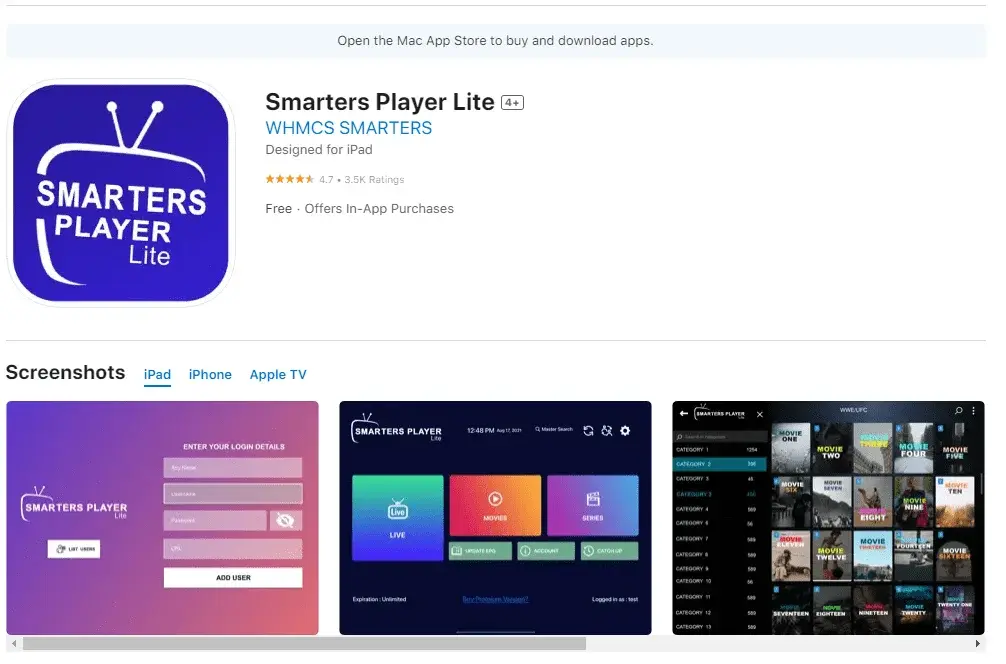
Download Smarters Player Lite from the App Store
- Open the App Store on your iPhone or iPad.
- Tap the Search icon, type "Smarters Player Lite", and review the official listing.
- Press Get (or the download icon) and authenticate with Face ID, Touch ID, or your Apple ID password.
- Wait for the status to change to Open, confirming installation.
- Locate the app on your Home Screen or App Library for quick access.
Launch and choose your authentication method
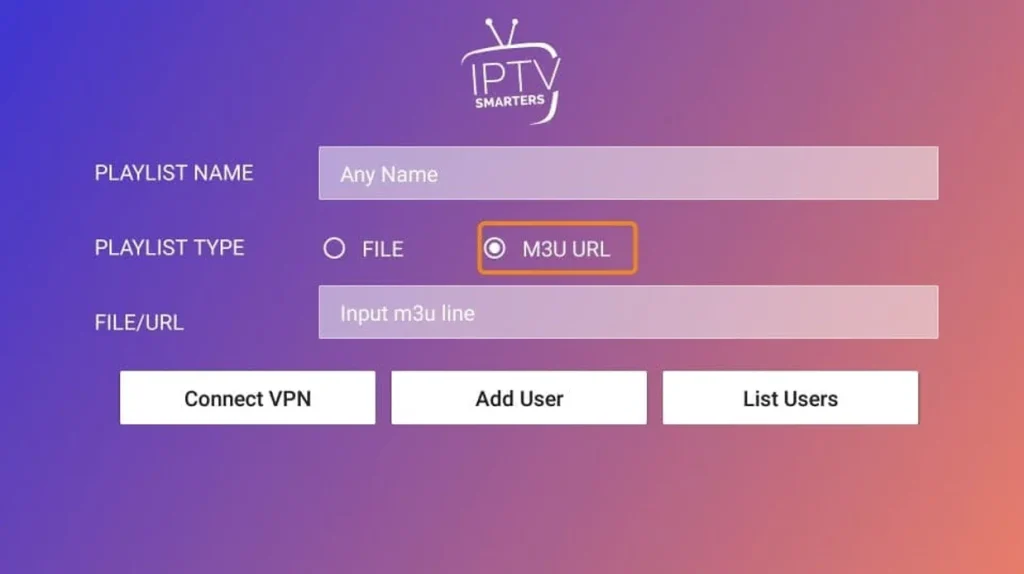
Open Smarters Player Lite, accept the terms, and pick how you want to add IPTV: upload an M3U playlist, paste a URL, or authenticate with Xtream Codes API. Match the option your provider supports.
Enter your IPTV provider credentials
Option A: Load an M3U Playlist URL
- Choose the "Load Your Playlist" or "File/URL" tile from the first screen.
- Give the playlist a friendly name (for example "My IPTV"), so you can recognize it later.
- Paste the exact M3U link your IPTV provider supplied—copy/paste to avoid typos.
- Tap Add User to let Smarters Player Lite verify the link and sync your channels.
Option B: Login with Xtream Codes API
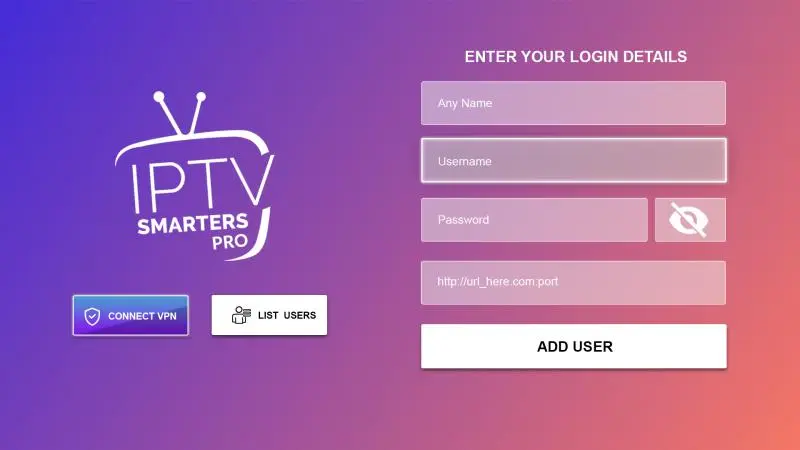
- Select the "Login with Xtream Codes API" option from the setup menu.
- Enter the Server/Portal URL exactly as issued by your IPTV provider.
- Fill in the Username and Password fields (case-sensitive).
- Tap Add User to authenticate and pull down live TV, films, and series categories.
Start streaming live TV, movies, and shows
Once the playlist finishes loading, browse Live TV, Films, Shows, and Categories tabs. Tap any channel or title to begin streaming instantly.
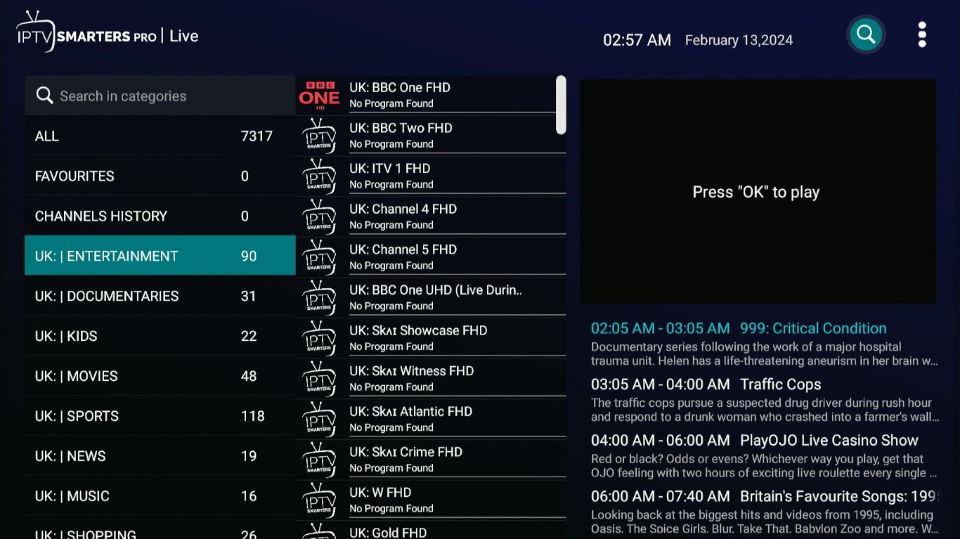
Advanced features inside Smarters Player Lite
Player preferences
- Pick the streaming quality that matches your internet speed (SD, HD, or Full HD).
- Toggle subtitles on/off and choose default subtitle languages.
- Switch audio tracks when multilingual audio is available.
- Apply light or dark theme for better readability indoors or outdoors.
Electronic Program Guide (EPG)
- Enable EPG data from the settings menu to see upcoming programs.
- Preview several days in advance and read show descriptions.
- Set reminders for can’t-miss live events or favorite series.
Parental controls
- Create a secure PIN to lock specific content categories.
- Filter by age ratings to keep the guide family-friendly.
- Build separate profiles so adults and kids keep their own watch lists.
Optimize your streaming setup
- •Use stable Wi-Fi for HD streams; 5G or strong 4G works when traveling, but monitor data usage.
- •Aim for at least 3–5 Mbps for SD, 5–10 Mbps for HD, and 15+ Mbps for Full HD playback.
- •Close other data-heavy apps before launching Smarters Player Lite to free memory.
- •Restart the iPhone/iPad occasionally so cached processes do not slow the player.
- •Update both iOS and the IPTV app regularly for bug fixes and compatibility.
Manage storage & multiple subscriptions
- •Clear the IPTV app cache if thumbnails or playlists feel sluggish.
- •Free space by deleting unused offline files or rarely used apps.
- •Use iCloud or external storage for large photos/videos to keep local storage available.
- •Offload the IPTV app in Settings if you need to reclaim space temporarily—your login details return after reinstall.
Smarters Player Lite also supports multiple playlists, so you can juggle different IPTV providers or family profiles in one place.
Troubleshooting & FAQ
Is Smarters Player Lite free on iOS?
Yes. The app is free to download and use, but you still need a paid IPTV subscription to unlock channels, movies, and shows.
Channels are not loading—what now?
Check Wi-Fi or cellular stability, re-enter the M3U/Xtream credentials directly from your provider portal, confirm your subscription is active, fully close and relaunch the app, then look for updates in the App Store.
Can I install the app on multiple iOS devices?
Absolutely. Download Smarters Player Lite on every iPhone or iPad you own, then reuse the same IPTV credentials. Simultaneous streams depend on your provider’s plan (often 1–5 connections).
Why am I buffering?
Run a speed test, move closer to the router, drop the stream quality, clear cache, restart the device, and ensure enough free storage. If issues persist, contact your IPTV provider to rule out server congestion.
Is IPTV legal on Apple devices?
The Smarters Player Lite app is legal software. Legal compliance depends on using licensed IPTV providers that secure rights for the content they distribute and follow local regulations.
Can I download streams for offline viewing?
No. Smarters Player Lite focuses on live and on-demand streaming only, so you must stay connected to the internet while watching.
Alternative IPTV apps for Apple iOS
- •IPTV Smarters Pro – premium interface with additional customization.
- •Perfect Player IPTV – granular playlist management and skins.
- •TiviMate IPTV Player – polished design plus robust EPG features.
- •GSE Smart IPTV – powerful player with extensive format support.
- •Helix IPTV – simple layout for quick channel surfing.
Conclusion
Setting up IPTV on Apple iOS with Smarters Player Lite takes just a few minutes: download the app, log in with your IPTV provider’s M3U or Xtream credentials, and start streaming. Keep the app updated, maintain a strong connection, and choose legitimate IPTV services for the smoothest viewing experience wherever you carry your iPhone or iPad.